AWS Organisation-Level Onboarding through Cloud Formation Method
Last updated: April 6, 2026
Introduction
This guide explains the step-by-step process to set up an Organisation-Level AWS Integration in the Matters Console using CloudFormation.
The integration connects your AWS Organization (including the Management Account and member accounts) to Matters by deploying the required IAM roles through AWS CloudFormation and StackSets. This enables Matters to securely access and monitor resources across all selected AWS accounts from a centralized dashboard.
By following the steps below, you will:
Connect your AWS Management Account
Deploy the required roles across member accounts
Review and save the integration details in the Matters Console
Once the integration is successfully completed, you will be able to discover and classify data stores for sensitive entities across your AWS accounts directly from the Matters dashboard.
Step 1: Start Integration from Matters Console
Log in to the Matters Console.
Navigate to:
Integrations → Cloud → AWS → Connect
Link: Link to Integrations Page
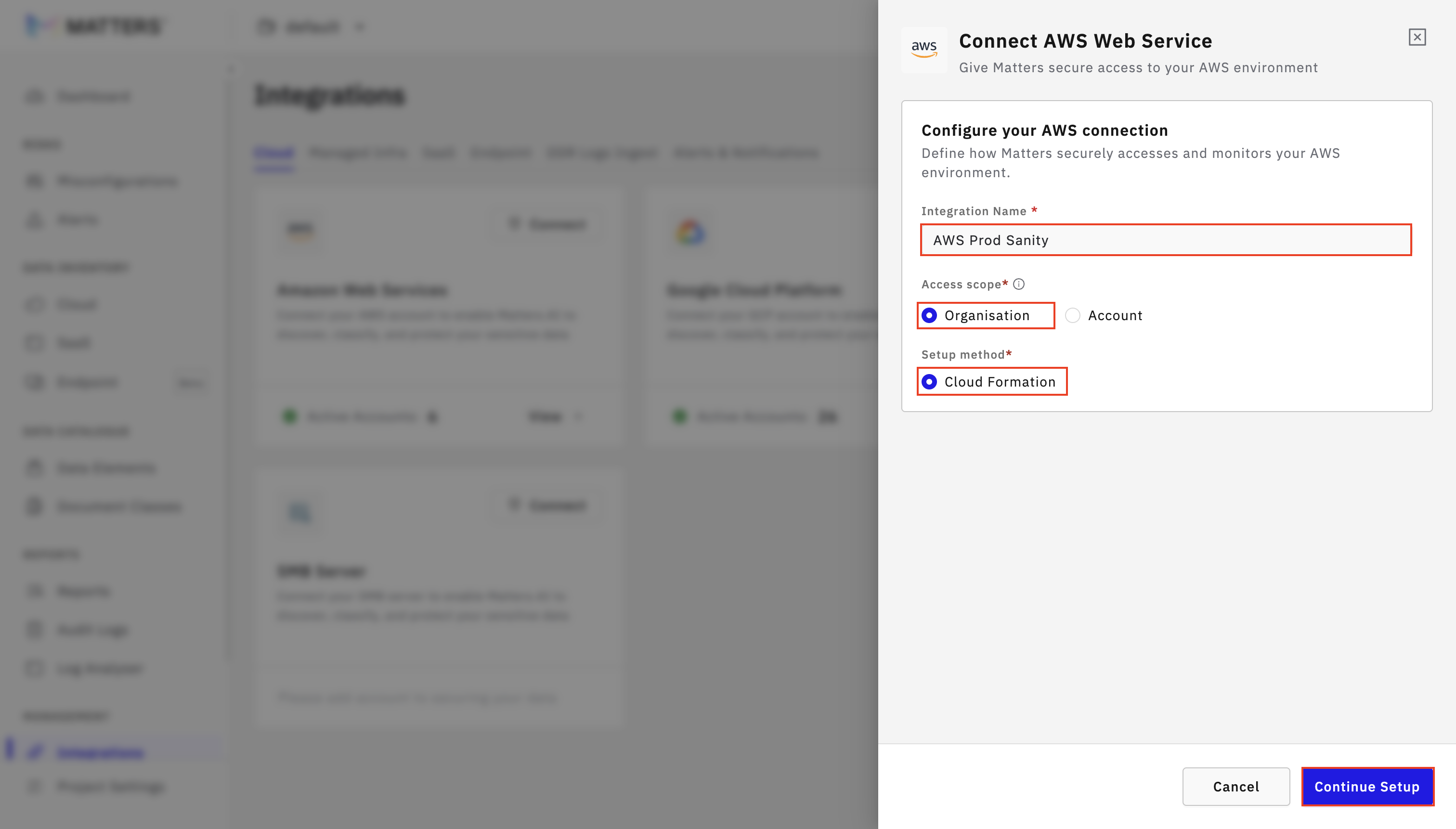
Enter a valid Integration Name.
Select Organisation as the access scope and Cloud Formation as Setup method.
Click on Continue Setup
Step 2: Initiate Management Account Integration
Log in to your AWS Management Console.
In the Matters Dashboard , click on the “AWS Cloud Formation 1” button to view and run the template.

You will be redirected to the CloudFormation Quick Create Stack page.
Scroll to the bottom of the page.
Check the box:
“I acknowledge that AWS CloudFormation might create IAM resources with customised names.”
Click on the Create Stack button.

Once the stack is created, go to the Outputs section and copy the Role ARN to use it for the integration.

Return to the Matters Dashboard, paste the ARN into the “Management Account Role ARN” field. Click on I’ve Created the Management Role.

Step 3: Deploy Matters Roles Across Accounts
In the next step, copy the AWS CloudFormation StackSet Template URL and External Id from the left panel.

Click on the “AWS Cloud Formation 2” button to launch the AWS CloudFormation Stack template.

You will be redirected to the AWS Create Stack Set page. Scroll down to Specify Template.
Select Amazon S3 URL as the template source.
Paste the copied S3 URL into the Amazon S3 URL field and Click on Next.

In the next step, Specify Stack Set Details:
Enter the Stack Set Name.
Add an optional description (if required).
Paste the previously copied External Id.
Click on Next.

In the Configure Stack Set Options :
Check the box:
“I acknowledge that AWS CloudFormation might create IAM resources with customised names.”
Click on Next.

In the Set Deployment Options page. Configure the region where you want to deploy the stacks. Click on Next.

Review all the configuration details and click on Submit.

Once the StackSet template is deployed, copy the Stack Set Name.

Return to the Matters Dashboard. Acknowledge by clicking on “I’ve Created the Stack Set.”

Step 4: Review and Save Access Details
Paste the previously deployed Stack Set Name.
Click on Save Integration.

In the next step, select or deselect the accounts that you want to add to the dashboard and Click on Save.

Once the integration is complete, a success message will be displayed on the UI.
If any of the accounts fail to integrate, you can retry adding them by clicking on the “Retry Failed Accounts” button.
Once the accounts are successfully integrated, all supported data stores across the selected AWS accounts will be automatically discovered in the Matters dashboard.

After discovery, you can click on the data store selectively and can run scans on specific data stores to identify and classify sensitive entities as per your requirements. This allows you to focus on relevant resources and efficiently manage sensitive data across your organization.